
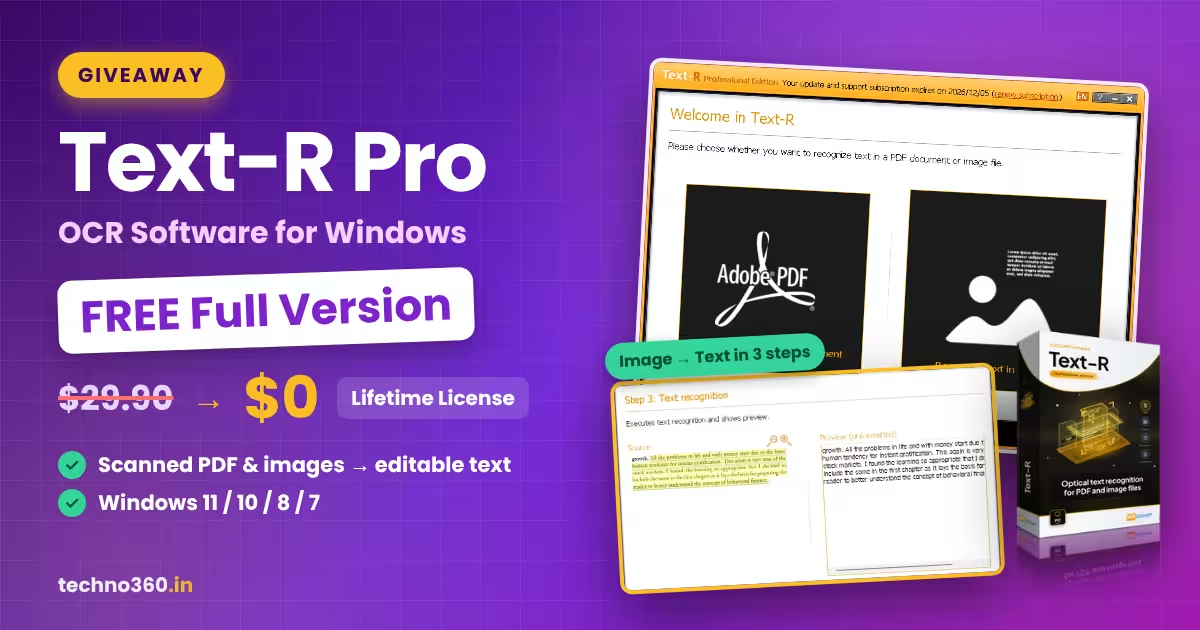
🎁 GIVEAWAY LIVE Worth $29.90 Windows
Turn scanned PDFs and photos into editable text, free for life
ASCOMP is giving away Text-R Professional 2.011, a Windows OCR tool that pulls text out of PDF documents and image files. We registered, installed and unlocked it ourselves. Here is exactly how it works.
⚡ Quick Read
- Software: Text-R Professional 2.011 by ASCOMP Software
- Regular price: $29.90
- License: Private (personal) license, unlimited usage period
- Updates & support: 30 days from registration
- Activation: 10-digit customer ID from your ASCOMP account
- Platform: Windows 11, 10, 8.1, 8, 7 (32-bit and 64-bit)
Ever received a scanned contract, a photographed receipt or an old PDF where you can’t select a single word? Retyping it by hand is slow and error-prone. That’s the job OCR (optical character recognition) software does for you, and right now you can get a paid one at no cost.
ASCOMP Software has opened a new giveaway for Text-R Professional. The registration page promises a full version with unlimited validity, and our test confirmed it: the customer area lists the usage period as “unlimited”. Below you’ll find what the program does, how we claimed and activated it step by step, and what you give up compared with a paid copy.
What Is Text-R Pro?
Text-R is a lightweight Windows OCR program from German developer ASCOMP, the company behind Synchredible, BackUp Maker and Secure Eraser. It reads the text inside PDF documents and image files (JPG, PNG, TIFF and multi-page PDFs, according to the developer) and turns it into text you can copy, edit and search.
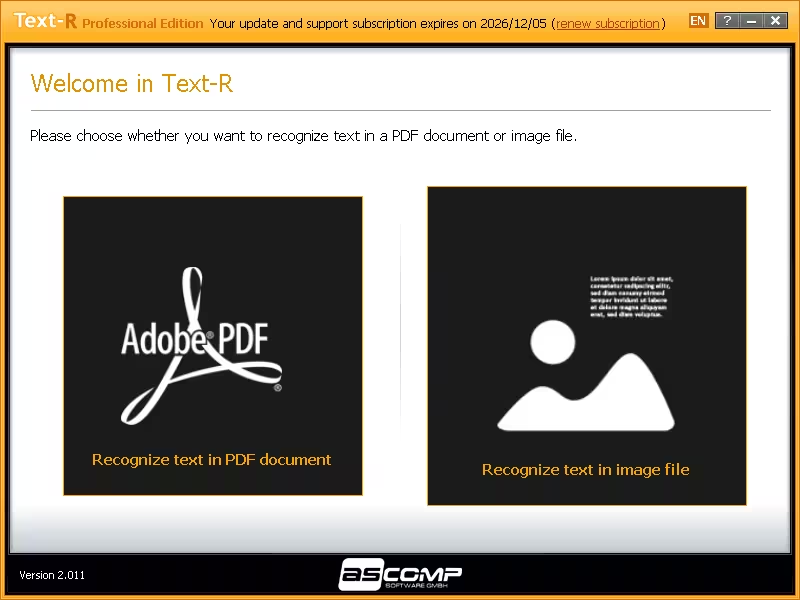
There’s no ribbon full of menus. When you open it, you pick one of two big tiles, “Recognize text in PDF document” or “Recognize text in image file”, and a three-step wizard does the rest.
Key Features of Text-R Professional
- PDF and image OCR: extract text from scanned PDFs, screenshots, photos and book pages.
- Editable output: save results as PDF or RTF (opens in Microsoft Word, WordPad or LibreOffice), with formatting kept close to the original.
- Multi-language recognition: choose one or more text languages from a scrollable list, including English, German, French, Italian, Danish, Finnish, Indonesian and more.
- Skew and rotation correction: detects sloped scans and pages rotated by 90°, 180° or 270°.
- Clean-up filters: an interference filter for noisy scans and an option to detect and remove lines (handy for forms and tables).
- Barcode scanning: reads barcodes alongside regular text.
- Mixed characters and dictionaries: handles words that mix numbers and letters (invoice numbers, part codes) and uses built-in dictionaries to improve accuracy.
- Side-by-side preview: compare the source image with the recognized text before saving.
Giveaway Details at a Glance
| Product | Text-R Professional (Private license) |
| Version tested | 2.011 |
| Normal price | $29.90 |
| Usage period | Unlimited |
| Free updates & support | 30 days from registration |
| Optional extension | 2 more years of updates offered for $19.90 in the customer menu |
| Giveaway end date | Not announced, so claim it while it’s live |
How to Get Text-R Pro Full Version for Free
The process has changed from earlier ASCOMP giveaways. The installer is no longer pre-activated; instead you unlock the program with a 10-digit customer ID from your ASCOMP account. The whole thing takes about five minutes.
Step 1: Register on the giveaway page
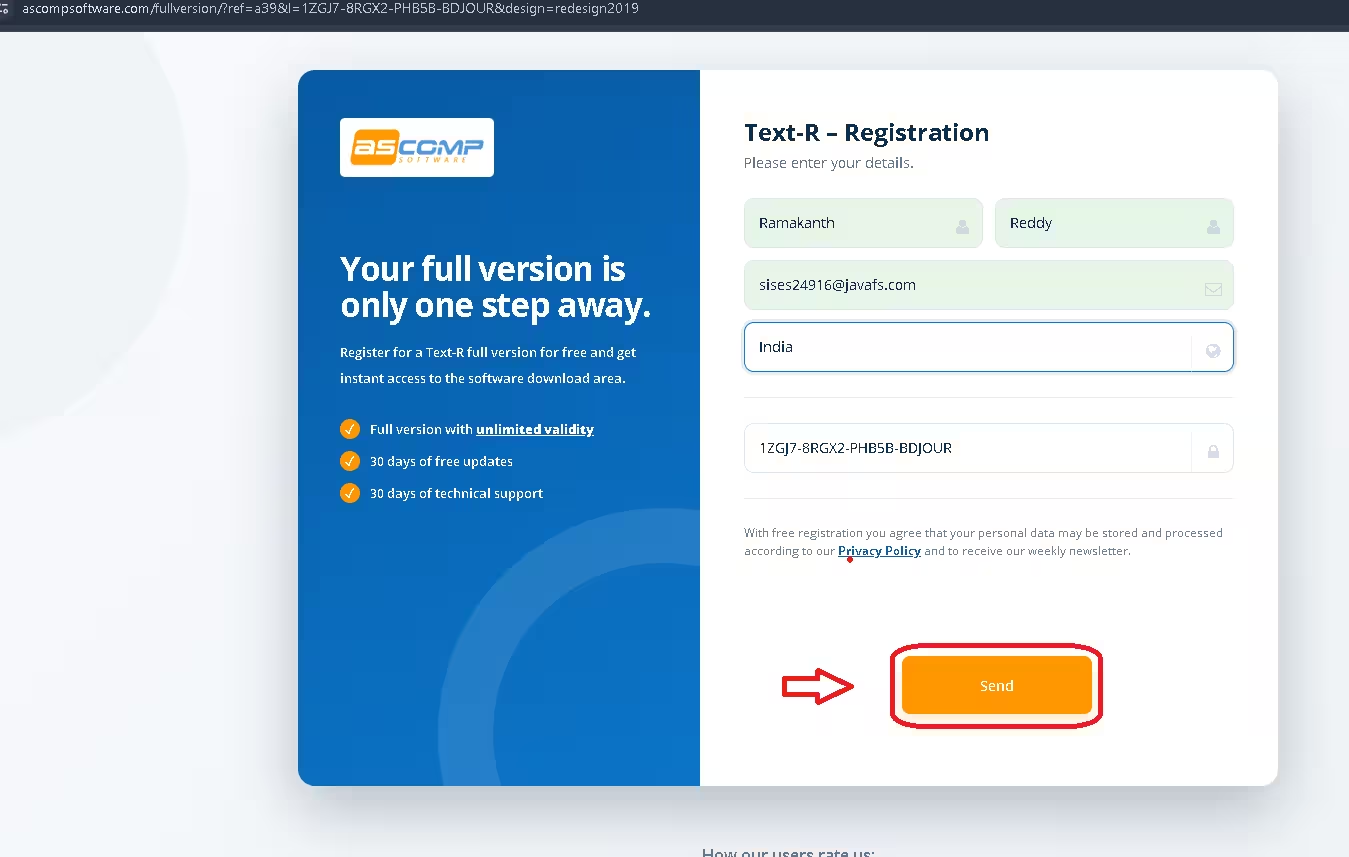
Open the official Text-R giveaway page. Enter your first name, last name and email address, and choose your country. The giveaway code is already filled in. Click Send.
Step 2: Confirm your email
Within a minute you’ll get an email from ASCOMP Software with the subject “Your ASCOMP software registration”. Click the confirmation link inside it. If it isn’t in your inbox, check the spam or promotions folder.
Step 3: Copy your customer ID and download the installer
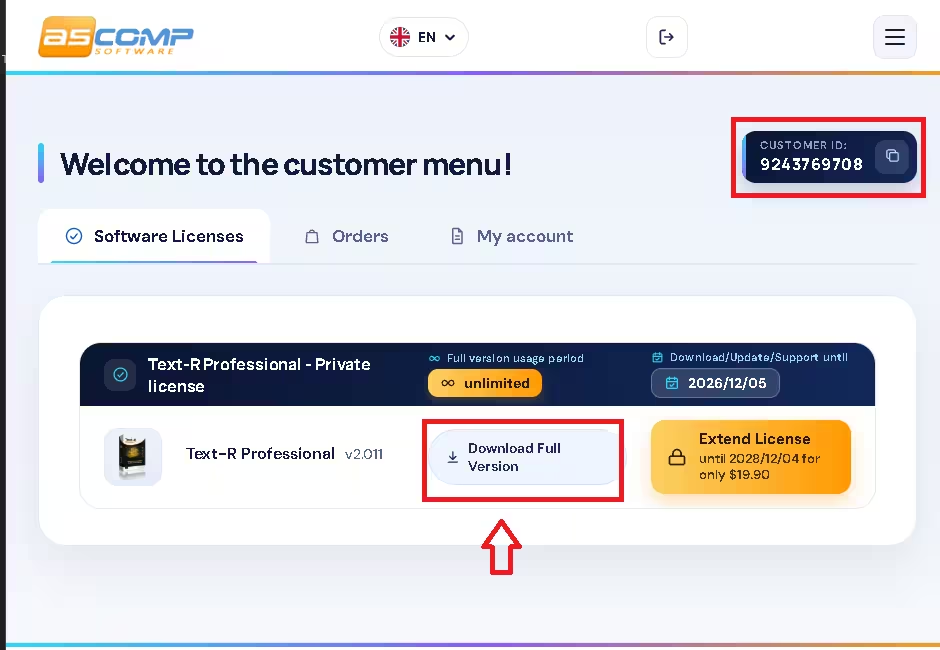
The link opens ASCOMP’s customer menu. Under Software Licenses you’ll see “Text-R Professional – Private license” with an unlimited usage period. Note the 10-digit customer ID at the top right (there’s a copy button), then click Download Full Version.
Step 4: Install Text-R
Run the downloaded file (textrW.exe). Pick your setup language, accept the licence agreement and click through the wizard. In our install, the wizard showed no bundled third-party offers.
Step 5: Unlock with your customer ID
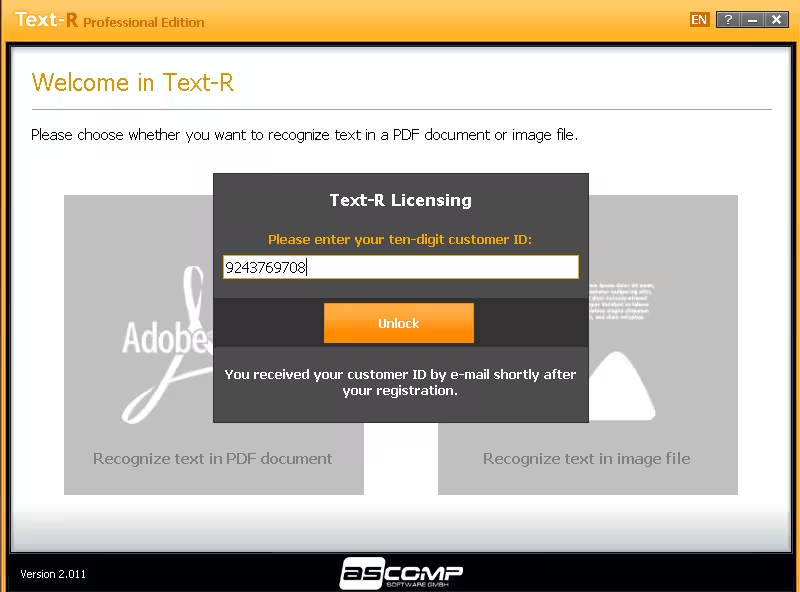
On first launch, Text-R shows a licensing prompt. Paste your 10-digit customer ID and click Unlock. Once it’s activated, the title bar shows “Professional Edition” along with the date your update and support period ends.
How to Use Text-R: Our Hands-On Test
We tested the image workflow on a photo of a printed book paragraph:
- Choose image file: drag and drop the image or click Choose file. Text-R highlights the text blocks it finds.
- Set preferences: all seven OCR options (barcodes, sloped images, rotation, interference filter, line removal, mixed characters, dictionary) are on by default, and English is pre-selected. Tick any other languages your document uses, then click Start recognition.
- Text recognition: the source appears on the left with an unformatted preview on the right. Click Save document to export.
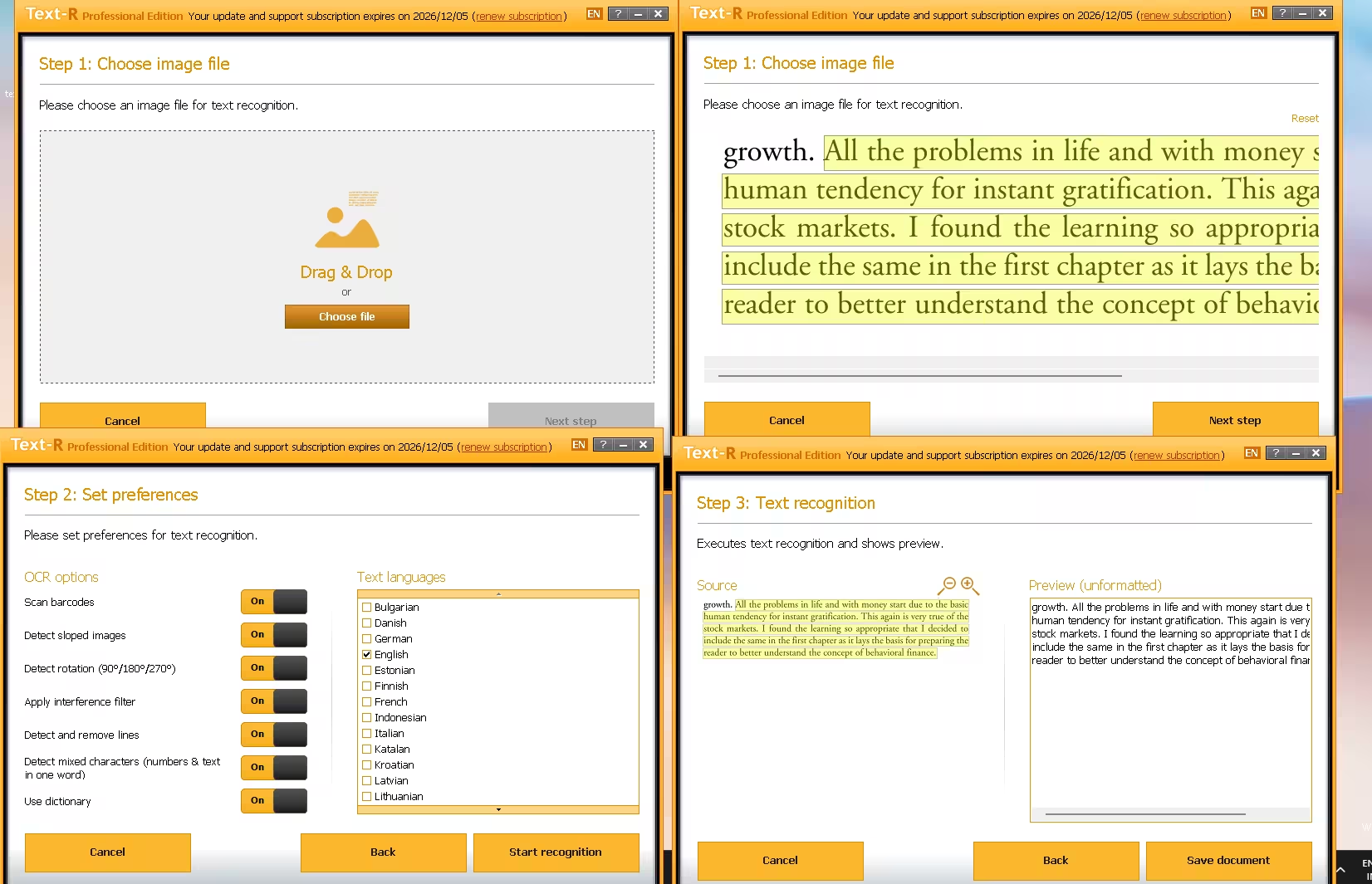
On this clean, well-lit page, the recognized text matched the source with no errors we could spot. The PDF workflow uses the same three steps; you just pick a PDF in step 1 and get a page preview instead.
Tip: OCR accuracy depends heavily on the input. Straight, high-contrast scans at 300 DPI give far better results than blurry phone shots or handwriting.
Giveaway Limitations You Should Know
- Private licence only: the giveaway copy is licensed for personal use, not business use.
- 30 days of updates and support: the program keeps working after that, but new versions require a paid extension.
- Newsletter opt-in: registering signs you up for ASCOMP’s weekly newsletter. You can unsubscribe from any email.
- Keep your customer ID safe: you’ll need it again if you reinstall Windows, so save the email or note the ID somewhere.
System Requirements
- OS: Windows 11, 10, 8.1, 8, 7 and Windows Server 2012–2025 (32-bit and 64-bit)
- Processor: Intel-compatible or Windows on ARM
- RAM: 2 GB minimum, 4 GB recommended
- Disk space: 50 MB
📊 Our Verdict
Text-R Pro isn’t trying to be ABBYY FineReader, and that’s the point. It’s a simple, wizard-driven OCR tool that gets text out of scans and images without a learning curve. For a free, unlimited licence, it’s well worth keeping on any Windows PC that deals with paperwork.
👍 Pros
- Unlimited full version, no time bomb
- Very easy three-step workflow
- Handles skewed and rotated scans, barcodes and mixed characters
- Lightweight: 50 MB on disk, runs on older PCs
👎 Cons
- Personal use only
- Only 30 days of free updates
- Exports to PDF and RTF only, with no direct DOCX or TXT export
Frequently Asked Questions
Is Text-R Pro really free?
Yes. Through this ASCOMP giveaway you get a Text-R Professional private licence with an unlimited usage period at no cost. Only the update and support window is limited to 30 days.
Does the full version expire after 30 days?
No. The program keeps working permanently. What ends after 30 days is access to free updates and technical support.
Where do I find my 10-digit customer ID?
After you confirm your email, the ASCOMP customer menu shows it at the top right, with a copy button. Enter it in the Text-R licensing window and click Unlock.
Can Text-R convert a scanned PDF to Word?
Yes, indirectly. Save the result as RTF and it opens in Microsoft Word, where you can edit it and save it as DOCX.
Can I use the giveaway licence for work?
No. The giveaway is a private licence, so commercial use requires buying a business licence from ASCOMP.
Does Text-R work on Windows 11?
Yes. We installed and tested version 2.011 on Windows 11, and ASCOMP lists support back to Windows 7, including Windows on ARM devices.
More Free Windows Software Giveaways
Discover more from Techno360
Subscribe to get the latest posts sent to your email.

You must be logged in to post a comment.