
![Backup4all Lite 9.9 for FREE - Value US$29.99 [Windows]](https://techno360.in/wp-content/uploads/2020/08/Backup4all-9-Box-shot.avif "Backup4all Lite 9.9 for FREE - Value US$29.99 [Windows]")
Backup4all Lite is the perfect solution for safeguarding your important data on a Windows system effortlessly.
Tailored for home users and beginners, this lite version offers essential features to ensure the security of your valuable data.
With a user-friendly interface designed with beginners in mind, you won’t have to navigate through complex settings.
One remarkable feature of this backup tool is the ability to compress and encrypt your backups, providing an added layer of protection against unauthorized access to your files.

Contents
With Backup4all, you can easily backup to multiple destinations:
- Local – back-up to local HDD or DVD, CD, Blu-ray
- External – back-up to external HDDs (USB/FireWire enclosures) or removable media (i.e. USB drives).
- Network – back-up to network destinations
To set up a new backup job, open the software and choose between wizard mode or advanced mode. In the wizard mode (for beginners), click “New,” give your backup a name, and pick a location to store it.
You have the flexibility to save your backup on various options, such as a local hard disk, external drive, removable device, optical disk, or network. Once you’ve selected the destination, it’s time to choose the files and folders you want to include in the backup.
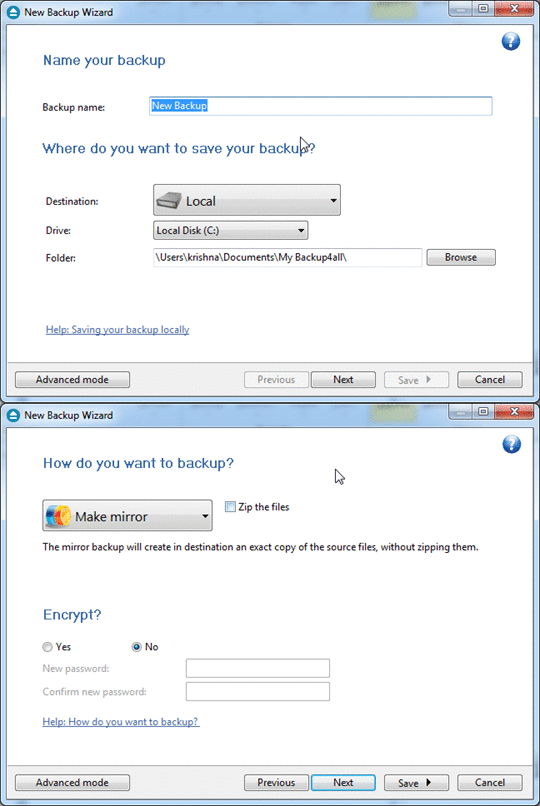
Add your desired folders or files to the backup source list by clicking “Add Folder” or “Add Files.” If you wish to zip and encrypt the backup, you can customize the options or stick with the default settings.
Next, decide if you want to perform a manual backup or schedule an automatic one. Follow the steps to complete the process.
This backup software supports ZIP64, enabling backups larger than 4GB, and generates standard zip files that can be used with any zip-compatible tool.
Backup4all works with Windows 11, 10, 8, 7, Vista, and XP, as well as Windows Server 2016, 2012, 2008 Server, and 2003 Server. It needs around 100MB of free disk space.
Get Backup4all Lite v9.9 for FREE:
Usually, this backup software is priced at $29.99 for a single-user license. However, the developer is currently offering a free license to all.
Visit this Giveaway page: https://www.backup4all.com/promo.html
To obtain the license code, simply provide your email address on the giveaway page.
To download the setup file directly, click here: [Direct Link].
For a portable version, visit the developer page.


Discover more from Techno360
Subscribe to get the latest posts sent to your email.
You must be logged in to post a comment.